Home
Home is the first screen after you log in to the VIP portal. It lists each event in the app where you are a speaker or an exhibitor. To log in, see Login.
See your events
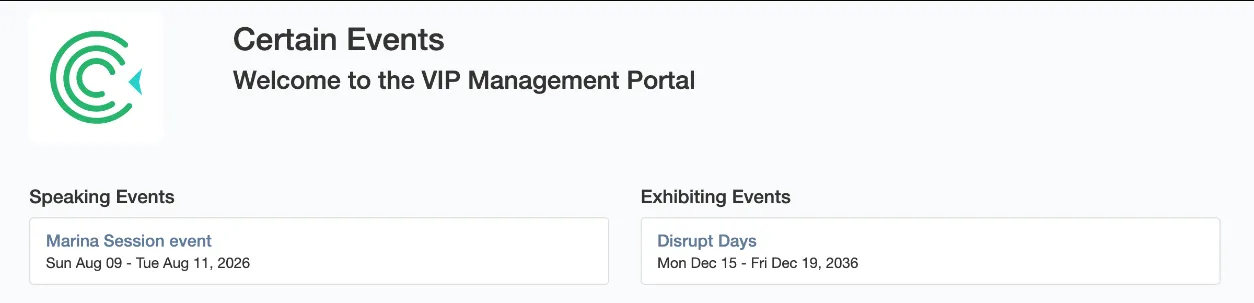
The top of the screen shows the app icon, the app name, and Welcome to the VIP Management Portal.
Under that, the screen shows one or two lists:
- Speaking Events: the events where you are a speaker.
- Exhibiting Events: the events where you are the VIP contact of an exhibitor.
Each item shows the event name and its dates. The events are in order of their start date, earliest first.
If you are not a speaker or an exhibitor at any event that uses the portal, the screen shows You are not currently speaking or exhibiting at any events.
The lists do not show archived events. They also do not show events that do not have the portal add-on for your role.
If an event that you expect is not in a list, ask the event organizer to check two things: the email address they added for you, and the portal add-on of the event.
Open a profile
Click an event name in a list.
- From Speaking Events, your speaker profile for that event opens. See Speaker profile.
- From Exhibiting Events, the exhibitor profile for that event opens. See Exhibitor profile.
When you have one speaker profile and no exhibitor, or one exhibitor and no speaker profile, the portal skips Home after you log in. It opens that profile.
Go back to Home
Each screen has a path of links at the top, for example Home > event name > Speaker > your name. Click Home to come back to the list of events.
When you open a profile, the portal shows dates and times in the time zone of that event.
What you might not see
Your event’s plan and the event organizer control these items:
- Speaking Events. An event shows here only when it has the Speaker VIP Portal add-on, and your email address is the login email of a speaker in it.
- Exhibiting Events. An event shows here only when it has the Exhibitor VIP Portal add-on, and your email address is the VIP email of an exhibitor in it.
- Archived events. They do not show.